
My Portfolio
Yes! My portfolio is a project to be proud of. It combines all of the elements to create a great, SEO optimized, performant website. The portfolio is of course built with SvelteKit and Typescript.
Goals
From previous experience of making portfolio websites (which I never finished) I’ve set some clear goals for my (hopefully) final portfolio.
- Structured system for i18n
- Easily write projects & blogs without boilerplate
- Set up SEO correctly
- Focus on performance, but don’t loose an eye for design and accessibility
These are not standalone goals, but rather a system to ensure that I can create a great portfolio website that is easy to maintain and update.
Planning
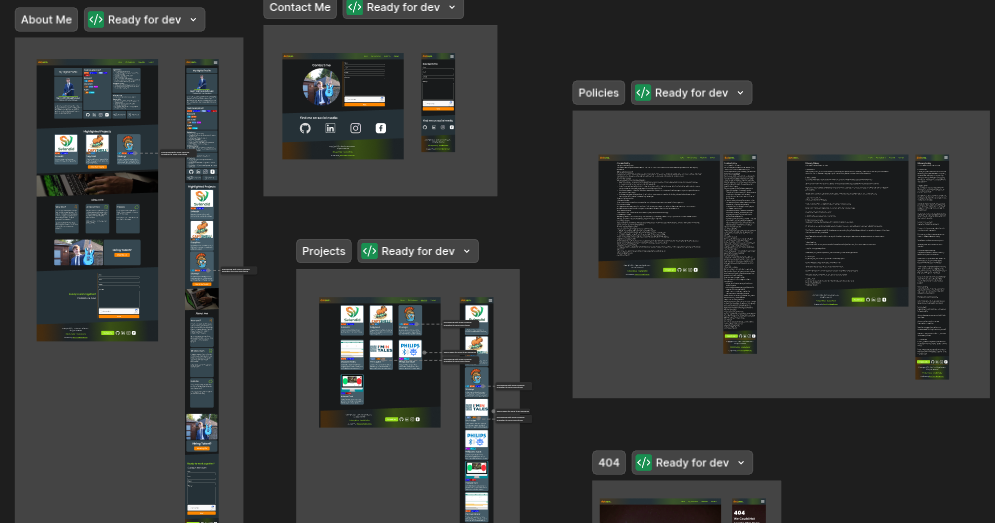
I started by creating a design on Figma. This allowed me to plan my design and layout before writing a single line of code.
Tech Stack
Framework
I chose to use SvelteKit and Typescript for this project. Svelte with SvelteKit are my favorite web framework to work with. It is not only easy to create components, integrate things, structure routes, … but it is also very performant and SEO friendly.
This is because Svelte is a compiled framework, bringing you maximum performance because it doesn’t use a virtual DOM and the freedom of custom syntax.
Styling
I also use TailwindCSS for styling. For a long time I was skeptical about TailwindCSS, and I still am a bit, but it is nice to work with for a portfolio website. CSS has its own quirks, and TailwindCSS tries to fix them, but it also introduces its own quirks. I’m personally not a fan of the reset of every element, every heading, every paragraph needs explicit styling. Luckily Tailwind Typography solves this issue mostly, it is a very handy plugin for styling markdown content.
I’m partially using shadcn components ported to Svelte. The philosophy behind shadcn is to use components as a base and customize them to your own needs. They are also styled with TailwindCSS.
Translations
For translations I used Inlang. This helps me route between languages and manage translations. The only downside is that I need to write the same content in multiple languages.
Content
For writing blogs & projects I use a markdown preprocessor for svelte called “mdsvex”. It allows me to write markdown files and convert them to HTML. This means that I can write all my projects & blogs in markdown format and it will automatically be converted and styled. Yes, this project description is written in markdown format. mdsvex also gives the ability to use Svelte components inside markdown files. Every image is a Svelte component for example. It also adds headers to the markdown files, here we define all meta data for the project, for example the title, slug, image, description, prog-lang, status, etc.
I’ve created a small CLI tool to automatically set up a new project or blog post. It takes care of filling in the headers and creating the basic folder structure.
Hosting
I use Netlify for hosting, this handles the deployment of the website with excellent Svelte integration. It also handles SSL certificates and custom domains via their own DNS management.
Every time I push a commit to the main branch, Netlify automatically builds and deploys the website for me.
SEO
SEO is an important aspect of a website, and I tried to implement it correctly. I’ve created a script that automatically generates a sitemap.xml to make sure that search engines can find and index the website. Google Search Console then takes care of crawling my website and indexing everything.
Conclusion
I’m really happy with how the portfolio turned out. It is a project that I can be proud of, and it is a project that I can use to showcase my skills and abilities. I would really appreciate it if you can share my portfolio with your network!